Every edit is a suggestion.
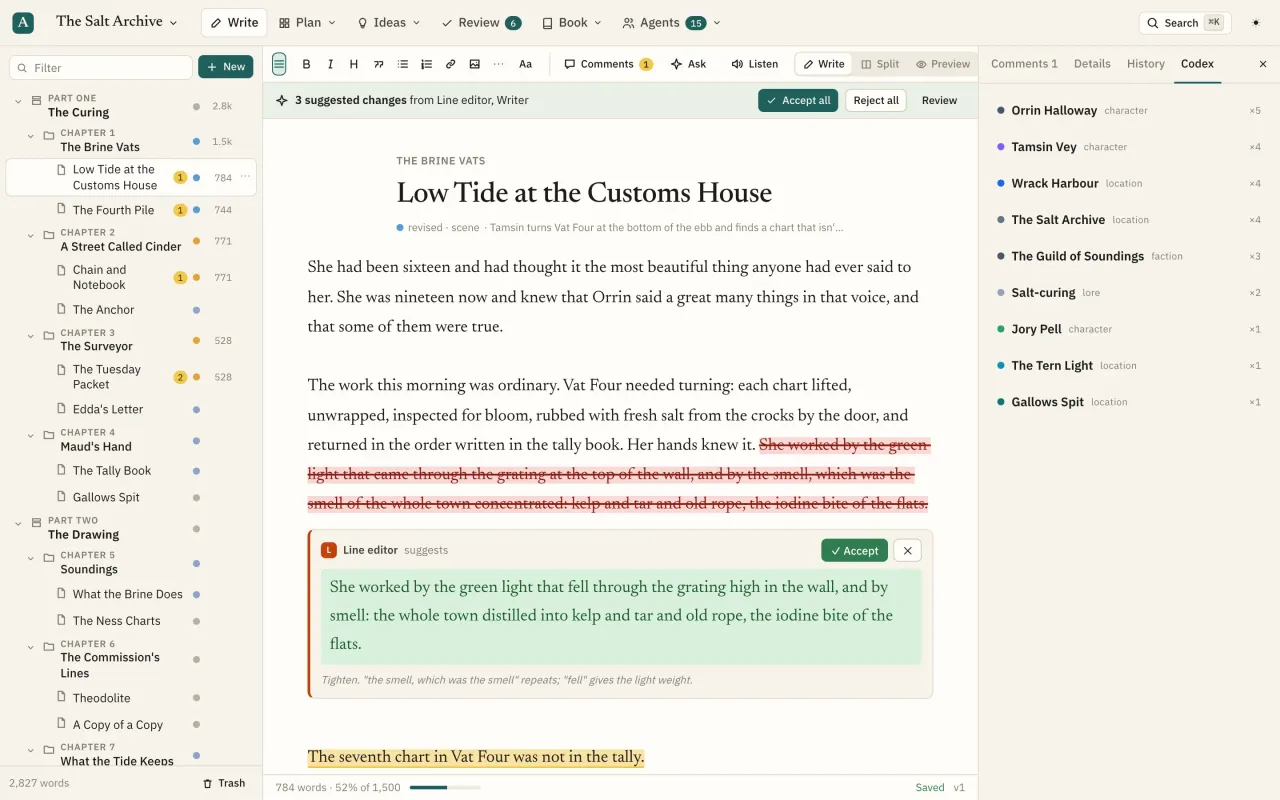
When an agent wants to change your prose, the change appears inline, beneath the paragraph it touches: old text struck in red, new text in green, the agent's reason, and Accept or Reject.
What you can do
Inline proposed changes
Each edit is its own card under the paragraph: the agent's avatar and name, what it wants to change and why, with Accept and Reject.
One change at a time
Accept applies just that change and credits it to the agent; Reject closes it.
Reject with a note
Shift-click Reject to say why. The note goes back to the agent as a task, and in-app agents revise on their own.
Accept all or reject all
A banner on each page counts the pending changes and who they're from, with Accept all and Reject all.
Rewrites split per paragraph
If an agent rewrites a whole page, the rewrite is split into one change per paragraph, so you can keep the good half.
Stale detection
If you've since changed the text a suggestion targets, it's marked as no longer matching instead of being forced in.
Review queue
Every proposal across the book in one place, filtered by open, accepted or rejected, with word-level diffs and long unchanged passages collapsed.
Multi-part proposals
One proposal can bundle text edits, new pages, moves, details, codex entries, timeline events and notes. Tick the parts you want and accept only those.
Validated before you see it
Proposals are dry-run against the current text when they're made, so broken ones go back to the agent instead of reaching you.
Keyboard review
j and k move between proposals; after you decide, the next one opens.
Every save versioned
Every change by you or an agent creates a revision with who and why. Open any version, see the word-level diff to now, and restore it.
Snapshots
Save the whole book under a name before a big revision, like Draft 1 complete.
Trash
Deleted pages and everything inside them go to the trash and can be restored together.
Conflict protection
If an agent changes a page while you're typing, you choose: load theirs or keep yours.
Questions
Can I undo something I accepted?
Yes. Open the page's History, pick the version before the change and restore it. The current text is kept in history too.
Is suggestions included on the Free plan?
Yes. Every feature is on every plan. Plans differ only in in-app agent allowance and workspace members.