A calm place to write.
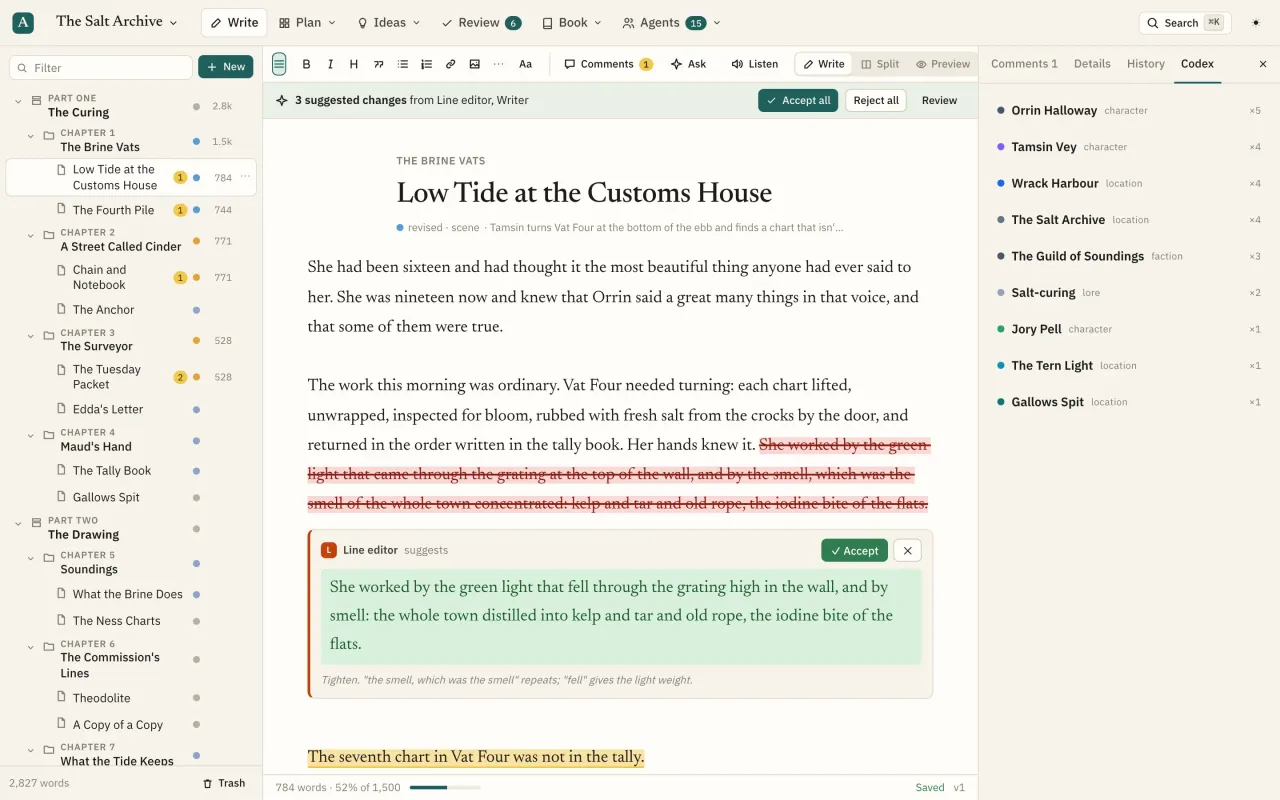
Parts, chapters and scenes, plus front and back matter, in a Markdown editor set in a book serif.
What you can do
Library
Every book on one shelf, grouped by series, with word counts against target, open comments and suggestions waiting.
New book in seconds
Title, kind, genre, logline, word target and a style guide, plus a structure template.
Style guide
Tense, POV, voice, spelling and banned words, followed by every agent.
Binder
A tree of parts, chapters and scenes with status dots, locks, comment counts and rolled-up word counts. Headings inside a page show as a mini-outline. Drag to restructure.
Page details
Synopsis, status (idea, outline, draft, revised, final), word target, POV character, story date and order, plotlines, labels and private notes.
Editor
Semi-rendered Markdown in a book serif: bold, italic, headings, quotes, lists, links, images and scene breaks, with a formatting toolbar.
Write, split or preview
Edit, side-by-side, or read it rendered. Previewing a chapter shows all its scenes as one continuous text.
Focus mode
Hide the binder and inspector and fade the toolbar until you need it.
Autosave
Saves as you pause, on ⌘S and when you leave, with the version number in the status bar.
Live word counts
Words on the page, words selected and progress to the page's target.
Images
Paste or drop images into the text; they upload and appear in exports.
Smart typography
Curly quotes and em dashes as you type, or convert a selection or page.
Import a draft
Bring in a Word, Markdown or text file. Headings become parts, chapters and scenes, scene breaks split chapters, and you preview the structure before anything is created.
Series
Group books into a series in reading order, with codex entries shared across them.
Resume where you left off
Opening a book returns you to the last page you edited.
Questions
Is manuscript included on the Free plan?
Yes. Free includes one book with no word limit; Pro adds unlimited books and series. Compare plans.