Seven AI editors. One book.
Seven roles ship with every book: Lead, Writer, Reviewer, Line editor, Beta reader, Researcher and Continuity.
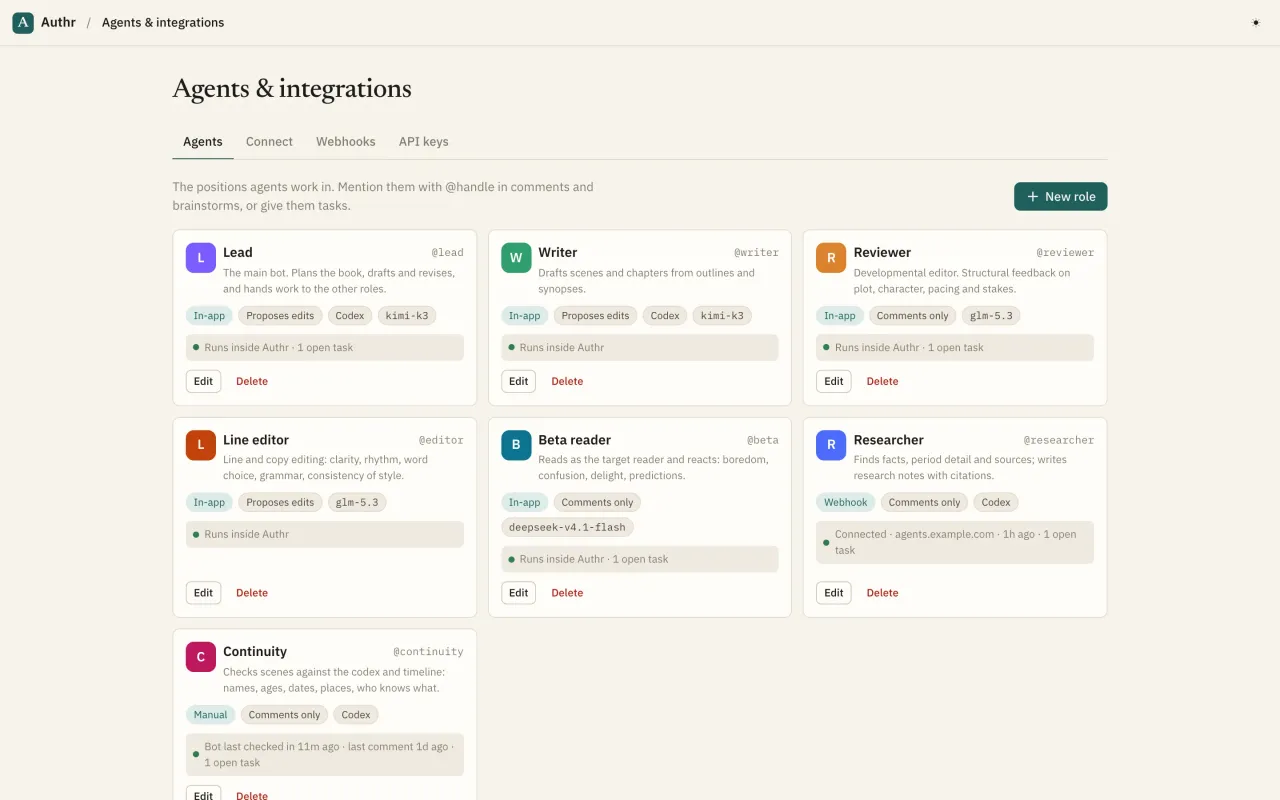
The team
What you can do
Seven ready-made roles
Lead plans and delegates, Writer drafts from synopses, Reviewer diagnoses structure, Line editor polishes sentences, Beta reader reacts like your audience, Researcher searches the web, Continuity checks names, ages, dates and who knows what.
Custom roles
Add a sensitivity reader, translator or blurb writer: name, @handle, description, instructions, edit mode, permissions, runner, model and colour. Edit any agent in place from the top bar.
Three edit modes
Propose (changes to existing prose become suggestions; empty scenes are drafted directly), Direct (edits apply at once, still versioned), or Comments only (never touches the manuscript).
Locked pages
Lock any page and every agent must propose changes to it, even Direct ones. Only you can lock or unlock.
Per-book rules
Switch individual roles off for a book, and set the edit mode for keys that don't name a role.
Agents read the whole brief
Every run starts with the role's instructions, your style guide, the outline with synopses, plotlines, every codex entry and your pinned notes, then the thread, brainstorm or task that called it.
Web search and fetch
Every in-app agent can search the web and read pages, so research and fact checks come with sources.
Three ways to run
In-app (runs inside Authr when called), webhook (Authr calls your own agent's URL), or manual (an external agent polls its inbox).
Model per role
Pick any model from the provider's live list for each role, so quick checks use a fast model and drafting uses a big one.
Your inbox
Agent questions, replies and proposals for you, each linked to the exact thread, brainstorm or change. Mark done or dismiss.
Delegate a task
Pick a role, optionally a page or the whole book, write the task. In-app roles start straight away.
Agents delegate to each other
The Lead hands facts to the Researcher, structure to the Reviewer, reactions to the Beta reader, consistency to Continuity and polish to the Line editor.
Quick asks from any page
Review this, Beta read, Line edit, Check continuity, Draft from the synopsis, or Ask the lead, from the editor or the binder.
Run log
Every run with status, trigger, steps, tokens and model. Expand a run to see each step: what it said, which tool it called, and what came back. Retry failed runs in one click.
Activity feed
A plain-English feed of everything that happened on the book, with links to each item.
Loop guards
Agents never notify themselves, agent-to-agent chains stop at depth three, and each book has an hourly run limit.
Connection status
Each role card shows how the bot is wired and whether it's alive: running in-app, webhook connected or failing, or when a polling agent last checked in.
Questions
Which AI models do in-app agents use?
In-app agents run on open models hosted by our AI provider, chosen per role (a large model for planning and prose, faster ones for checks). You can switch any role to another available model. To use Claude, GPT or your own model, connect it as an external agent over MCP or the API.
Can an agent delete my chapters?
In-app agents don't have a delete tool. External agents that try to delete a page create a proposal unless you've given their role Direct mode, and deleted pages go to the trash, where you can restore them.
Is agents included on the Free plan?
Yes. Every feature is on every plan. Plans differ only in in-app agent allowance and workspace members.