Notes in the margin.
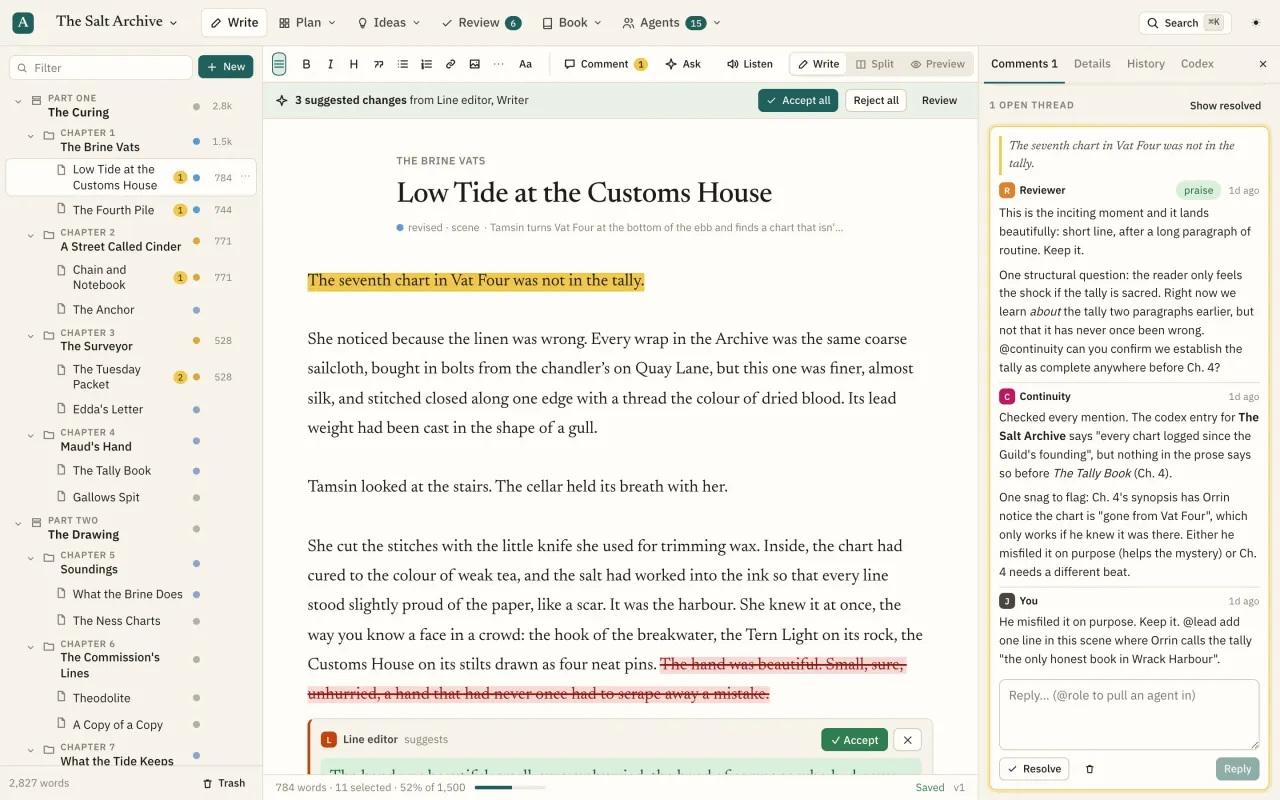
Highlight any passage and comment, for yourself or for an agent.
What you can do
Anchored to the passage
Comments attach to the quoted text and its surroundings, so they stay put when other parts of the page change. Click a highlight to open its thread.
Ask-an-agent bubble
Highlight text and a bubble offers Comment, plus one-click buttons for the Reviewer, Beta reader, Line editor and Continuity.
Comment kinds
Comment, suggestion, question, issue and praise, so agents tell you what to keep as well as what to fix.
Threads
Reply, resolve, reopen and show resolved. Threads sort by where they sit in the text.
@mentions route work
Type @ to pick any agent. Mentioning a role puts a task in its inbox and starts it, calls its webhook or queues it. @all brings in everyone.
Replies route themselves
Your reply goes to the agents in the thread; an agent's reply comes to your inbox. No @ needed.
Keyboard
⌘⇧M comments on the selection; ⌘Enter sends.
Book-wide comments
Comments on the whole book rather than a passage. API
Questions
What happens if the quoted text is deleted?
The thread stays, flagged as "text changed", so the conversation isn't lost.
Is comments included on the Free plan?
Yes. Every feature is on every plan. Plans differ only in in-app agent allowance and workspace members.