Take your book anywhere.
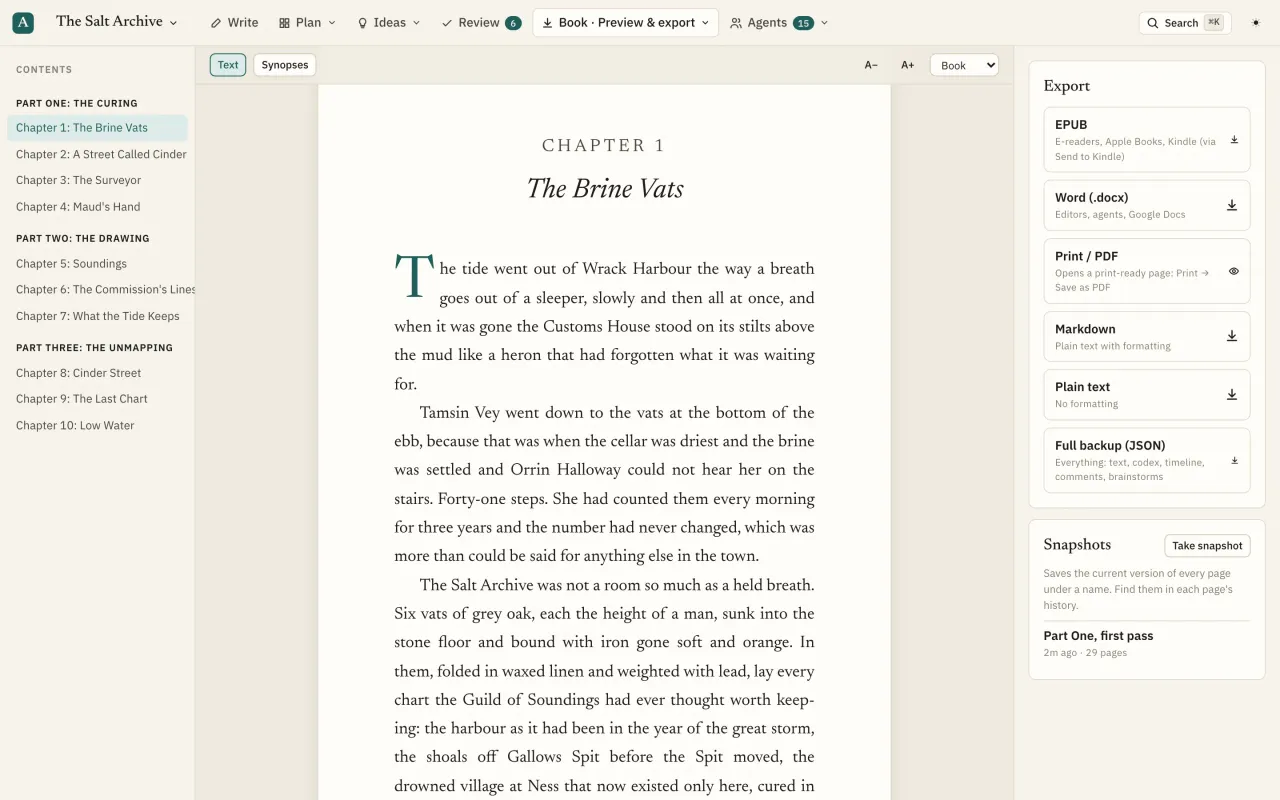
Preview the compiled book with a title page and contents, then export EPUB, Word, a print-ready page for PDF, Markdown, plain text or a full backup.
What you can do
Whole-book preview
A title page, then the book in reading order with chapter headings and your scene-break glyph. Contents sidebar, text size and width controls.
Synopsis mode
Read and export the book as its synopses for an outline or pitch.
EPUB 3
Title page, table of contents, embedded images and metadata, for e-readers, Apple Books and Send to Kindle.
Word (.docx)
A standard manuscript: title page, a page break per chapter, centred headings, first-line indents, scene breaks and images.
Print-ready PDF
A 6×9 inch book page in a serif face, justified and hyphenated, ready to print or save as PDF.
Markdown, plain text, JSON
Plain formats for any tool, and a full backup of the book: pages, codex, relationships, timeline, notes, comments, proposals and brainstorms.
Export settings
Choose the scene-break glyph and whether chapters are numbered.
Import
Word, Markdown or text files become parts, chapters and scenes, with a preview first.
Questions
Can I make a Kindle book?
Export EPUB, which Amazon's Send to Kindle and Kindle Direct Publishing accept.
Is export included on the Free plan?
Word and Markdown export are on every plan. Publish-ready EPUB and print PDF need Pro. Compare plans.